LangChain & RAG [Model I/O & Configuration]
LangChain & RAG [Model I/O & Configuration]
LangChain & RAG
What is a LangChain?
- LangChain은 거대언어모델(LLM)을 활용한 애플리케이션을 쉽게 개발할 수 있도록 도와주는 프레임워크이다.
- 쉽게 말해, LLM을 활용하는 Application과 LLM 사이를 이어주는 미들웨어의 역할을 한다.
- 사실 현업에서는 LangChain이 너무 무거운 프레임워크라는 인식이 있어서 많이 사용했다가, 요즘은 아예 AI Agent를 활용하여 구체적인 순서를 모두 AI에게 맡긴다.
그럼에도 불구하고, LangChain을 공부하는 이유는 LLM Model을 활용하는 방식과, 어떻게 프롬프트를 부여해야하는지 등, LLM을 활용하기 위한 기초(문법 & 패턴)를 다질 수 있기 때문이다.
Model_I/O & Configuration
- LLM과 상호작용하는 Interface
PromptTemplate
- 디스크에 저장하고 load할 수 있음
→ 규모가 큰 LLM을 개발할 때에는, Prompt가 중요 하기 때문에, 이런 프롬프트들을 DB나 파일 등에서 로드
1
2
t=PromptTemplate.from_template("What is the capital of {country}")
t.format(country="France")
1
2
3
4
5
6
t=PromptTemplate(
    template="What is the capital of {country}",
    input_variables=["country"],

)
t.format(country="France")
- 이 2가지 방식의 차이점은, 위의 .from_template는 입력으로 받은 프롬프트에서 알아서 input_variables, prompt들을 자동으로 인식하여 처리함
- 아래의 방식은 template, input_variables를 하나하나 지정해주는 방식 (LangChain Docs)
⇒ 결국 크게 다르진 않음
Few-shot Prompt
- 모델에게 어떻게 대답해야 하는지 알려주는 방식
- 내가 일일이 response에 대한 조건을 prompt를 통해 명령하는 것이 아니라, 어떻게 대답해야 하는지에 대한 예제를 제공해주는 것이 더 좋은 방법임
→ FewShotPromptTemplate
- ex) 만약 LLM에게 이전의 대화를 통해 어떻게 대답해야 하는 지에 대한 예제를 보여주고 싶다면, DB에 있는 이전 대화기록내용을 FewShotPromptTemplate를 통해 형식화를 시켜주면 속도가 빠름
1
2
3
4
5
6
7
8
9
10
11
12
13
14
15
16
17
18
19
20
21
22
23
24
25
26
27
28
29
30
31
32
33
34
35
36
37
38
39
40
41
42
examples=[
    {
        "question":"What do you know about France?",
        "answer":"""
        Here is what I know:
        Capital: Paris
        Language: Frence
        Food: Wine and Cheese
        Currency:Euro
        """,
    },
    {
        "question":"What do you know about Italy?",
        "answer":"""
        I know this:
        Capital:Rome
        Language: Italian
        Food: Pizza and Pasta
        Currency: Euro
        """,
    },
    {
        "question":"What do you know about Greece?",
        "answer":"""
        I know this:
        Capital: Athens
        Language: Greek
        Food: Souvlaki and Feta Cheese
        Currency: Euro
        """,
    },
]
chat.predict("What do you know about France?")

>> France is a country located in Western Europe.
It is known for its rich history, culture, and cuisine.
The capital city is Paris, which is famous for landmarks such as the Eiffel Tower
 and the Louvre Museum. France is also known for its wine production,
 fashion industry, and art scene. The country has a diverse landscape,
 including mountains, beaches, and countryside. French is the official language,
 and the currency is the Euro. France is a member of the European Union
 and is one of the most visited countries in the world.
- 이렇게 우리가 원하는 답변의 형식을 지정해줌
- “question”에 대한 “answer”를 지정
💡How to use FewShotPromptTemplate?
- 예제의 형식 지정
DB에서 로드할때, 어떤 형식으로 로드할지를 지정해준다고 생각
1
2
3
4
5
  example_template="""
      Human:{question}
      AI:{answer}
  """
  example_prompt=PromptTemplate.from_template(example_template)
Create Actual Prompt
1
2
3
4
5
6
7
8
9
10
 example_template="""
     Human:{question}
     AI:{answer}
 """
 example_prompt=PromptTemplate.from_template(example_template)
 prompt=FewShotPromptTemplate(
     example_prompt=example_prompt,
     examples=examples,
     suffix="Human: What do you know about {country}?"
 )
- FewShotPromptTemplate()을 사용하여 다음과 같이 prompt와 examples를 지정해주면, LangChain은 각각의 예제 리스트(examples)들을 example_prompt를 사용하여 형식화
- 어떻게 사용자의 질문을 처리할지?
1
2
3
4
5
6
7
8
9
10
11
12
13
example_template="""
    Human:{question}
    AI:{answer}
"""

example_prompt=PromptTemplate.from_template(example_template)

prompt=FewShotPromptTemplate(
    example_prompt=example_prompt,
    examples=examples,
    suffix="Human: What do you know about {country}?",
    input_variables=["country"]
)
- suffix → 형식화된 모든 예제 마지막에 나오는 내용 (예제를 모두 형식화한 후, 사용자의 질문이 무엇인지?)
- 사용자의 질문을 형식화
input_variables = [”country”]
- 정리해보자면,
- 예제 리스트를 생성하고, FewShotPromptTemplate에게 전달 (examples)
- 예제 리스트를 어떻게 형식화 할지 알려줌 (example_prompt)
- 사용자의 질문을 포함시킴 (suffix)
- 템플릿에서 사용할 입력 변수 설정 (input_variables)
→ 우리가 부여한 예제들과 똑같은 구조, 형태로 답변
1
2
3
4
5
6
7
8
9
10
11
12
13
14
15
16
17
18
19
20
21
22
23
24
25
26
27
28
example_template="""
    Human:{question}
    AI:{answer}
"""

example_prompt=PromptTemplate.from_template(example_template)

prompt=FewShotPromptTemplate(
    example_prompt=example_prompt,
    examples=examples,
    suffix="Human: What do you know about {country}?",
    input_variables=["country"]
)

prompt.format(country="Germany")

chain=prompt|chat
chain.invoke({
    "country":"Korea"
})

>>>
AI:
        Here is what I know:
        Capital: Seoul
        Language: Korean
        Food: Kimchi and Bulgogi
        Currency: South Korean Won
→ Chain을 통해 생성한 fewshotprompt를 통해 답변 생성 ( .invoke() )
(FewShotPromptTemplate에 지정해준 답변의 형식에 따라 동일한 형식으로 답변을 생성)
- get examples → create a prompt to format examples → use prompt to format examples (FewShotPromptTemplate) (examples, example_prompt, suffix, input_variables)
FewShotChatMessagePromptTemplate
- FewShotPromptTemplate (문자열 방식)
- FewShotChatMessagePromptTemplate (메시지 방식)
1
2
3
4
5
6
7
8
9
10
11
12
13
14
15
16
17
18
19
20
21
22
23
24
25
26
27
28
29
from langchain.prompts.few_shot import FewShotChatMessagePromptTemplate
from langchain.prompts import ChatPromptTemplate
example_prompt=ChatPromptTemplate.from_messages([
    ("human","What do you know about {country}"),
    ("ai","{answer}")
])

example_prompt=FewShotChatMessagePromptTemplate(
    example_prompt=example_prompt,
    examples=examples,
)
final_prompt=ChatPromptTemplate.from_messages(
    [
    ("system","You are a geography expert, you give short answers"),
    example_prompt,
    ("human","What do you know about {country}?"),
    ]
)

chain=final_prompt|chat
chain.invoke({"country": "Korea"})

>>>
I know this:
        There are two Koreas - North Korea and South Korea
        Capital of South Korea: Seoul
        Language: Korean
        Food: Kimchi and Bibimbap
        Currency: South Korean Won
- example_prompt → examples(예제)를 형식화하기 위함!
How to select Examples?
LengthBasedExampleSelector
- format examples
- 얼마나 examples들이 긴지 확인 (how long?)
- 예제 formatting 세팅 값에 따라 prompt에 알맞은 예제를 골라줌
1
2
3
4
5
6
7
8
9
10
11
12
13
14
15
16
17
18
19
20
21
22
23
24
25
26
example_template="""
    Human:{question}
    AI:{answer}
"""

example_prompt=PromptTemplate.from_template(example_template)

example_selector=LengthBasedExampleSelector(
    examples=examples,
    example_prompt=example_prompt,
    max_length=10,
)

prompt=FewShotPromptTemplate(
    example_prompt=example_prompt,
    examples=example_selector,
    suffix="Human: What do you know about {country}?",
    input_variables=["country"]
)

prompt.format(country="Germany")

chain=prompt|chat
chain.invoke({
    "country":"Korea"
})
- 이전에는 모든 example들을 형식에 맞게 형식화했다면, example_selector를 통해서 형식화할 example에 조건을 걸어줌 (max_length=10)
RandomExampleSelector()
1
2
3
4
5
6
7
8
9
10
from langchain.prompts.example_selector.base import BaseExampleSelector

class RandomExampleSelector(BaseExampleSelector):
    def __init__(self,examples):
        self.examples=examples
    def add_example(self,example):
        self.examples.append(example)
    def select_examples(self,input_variables):
        from random import choice
        return [choice(self.examples)]
- 예제들을 선택할때에 max_length뿐만 아니라, random으로 선택할 수 있음
- 이렇게 선택된 examples는 모델에게 few_shot으로 보여지게 됨
RandomExampleSelector는 add_example이라는 기능을 포함하고 있어야함
SemanticSimilarityExampleSelector → 의미 유사도 선택기
How to load Prompt Template?
import load_prompt
- 프롬프트 파일로부터 load하는 방식 (.json or .yaml)
prompt.json
1
2
3
4
5
6
7
{
    "_type":"prompt",
    "template":"What is the capital of {country}",
    "input_variables":[
        "country"
    ]
}
load_code
1
2
3
4
from langchain.prompts import load_prompt

prompt=load_prompt("./prompt.json")
prompt.format(country="Germany")
prompt.yaml
1
2
3
_type: "prompt"
template: "What is the capital of {country}"
input_variables: ["country"]
load_code
1
2
3
from langchain.prompts import load_prompt
prompt=load_prompt("./prompt.yaml")
prompt.format(country="Korea")
How to compose Prompts? (어떻게 Prompt들을 합칠것인가?)
PipeLinePromptTemplate
1
2
3
4
5
6
7
8
9
10
11
12
13
14
15
16
17
18
19
20
21
22
23
24
25
26
27
28
29
30
31
32
33
34
35
36
37
38
39
40
41
42
43
44
45
46
47
48
49
50
51
52
53
54
55
56
57
58
59
60
61
from langchain.chat_models import ChatOpenAI
from langchain.callbacks import StreamingStdOutCallbackHandler
from langchain.prompts.pipeline import PipelinePromptTemplate #많은 프롬프트들을 하나로 묶어주는 역할

chat=ChatOpenAI(
    temperature=0.1,
    streaming=True,
    callbacks=[
        StreamingStdOutCallbackHandler(),
    ],
)

intro = PromptTemplate.from_template(
    """
    You are a role playing assistant.
    And you are impersonating a {character}
"""
)

example = PromptTemplate.from_template(
    """
    This is an example of how you talk:

    Human: {example_question}
    You: {example_answer}
"""
)

start = PromptTemplate.from_template(
    """
    Start now!

    Human: {question}
    You:
"""
)

final = PromptTemplate.from_template(
    """
    {intro}

    {example}

    {start}
"""
)

prompt=[
    ("intro",intro),
    ("example",example),
    ("start",start),
]

full_prompt=PipelinePromptTemplate(final_prompt=final,pipeline_prompts=prompt)

full_prompt.format(
    character="Programmer",
    example_question="What is your role?",
    example_answer="I am an AI engineer",
    question="What is your specific research field?"
)
→ PipeLinePromptTemplate를 통해서 AI모델에게 보여줄 예제 (example)을 합칠 수 있다.
- final_prompt는 최종적으로 생성할 프롬프트 구성이고, pipeline_prompts는 최종 프롬프트를 구성할 프롬프트들을 명시해준다.
1
2
3
4
5
6
7
8
9
10
11
12
chain=full_prompt|chat
chain.invoke({
    "character":"Programmer",
    "example_question":"What is your role?",
    "example_answer":"I am an AI engineer",
    "question":"What is your specific research field?"
})

>>>
I specialize in machine learning and natural language processing.
My research focuses on developing algorithms and models that can understand
and generate human language.
Caching
- 이미 답변한 질문에 대한 답을 다시 가져와서 API Cost와 시간을 절약할 수 있음
- LM(LLM)의 응답을 저장할 수 있음
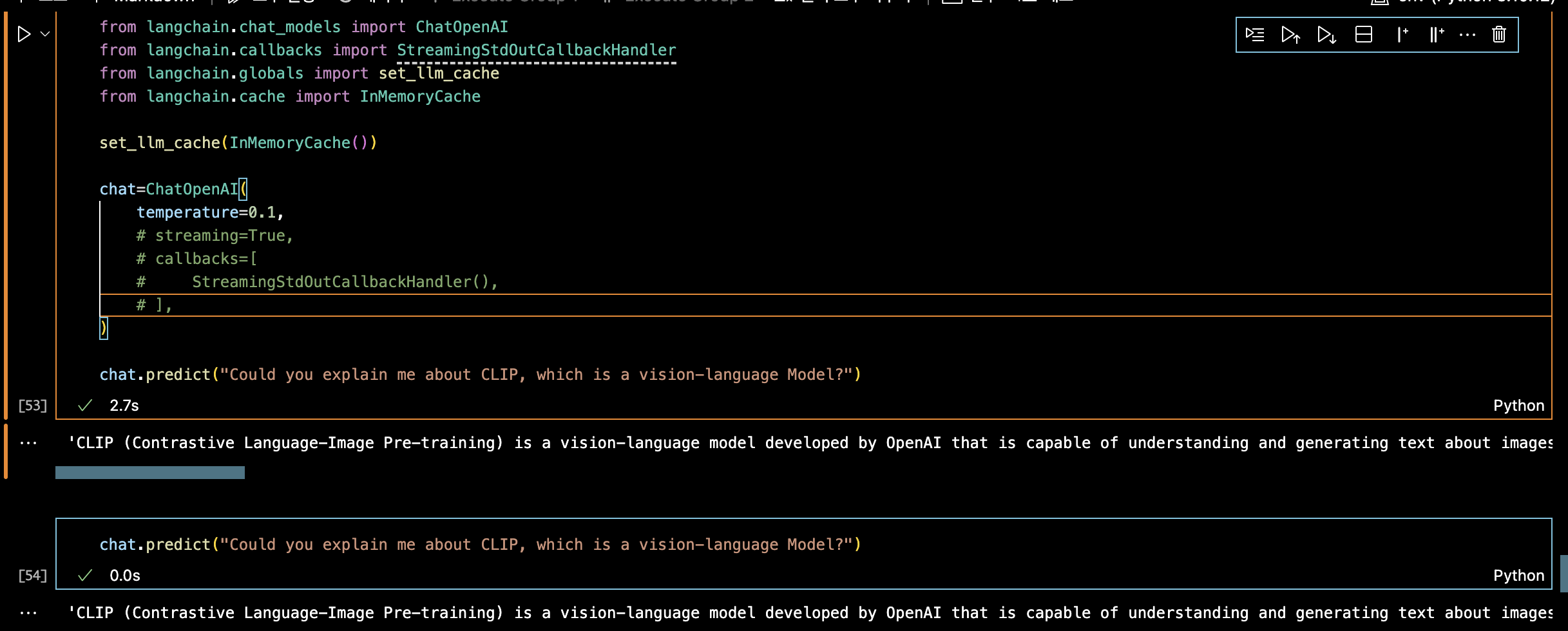
- set_llm_cache를 통해 이전에 물어본 질문을 다시 물어보면 답변을 하는 속도가 눈에 띄게 빨라짐
→ 메모리에 caching을 하고 있기 때문에, chat을 restart한다면, 질문했던 것이 사라짐
→ cache를 메모리가 아닌 곳에 저장하고 싶다면? (비휘발성으로 관리하고 싶다면?)
1
2
3
4
5
6
7
8
9
10
11
12
from langchain.cache import InMemoryCache, SQLiteCache

set_llm_cache(SQLiteCache("cache.db"))

chat=ChatOpenAI(
    temperature=0.1,
    # streaming=True,
    # callbacks=[
    #     StreamingStdOutCallbackHandler(),
    # ],
)
chat.predict("Could you explain me about CLIP, which is a vision-language Model?")
Serialization
1
2
3
4
5
6
7
8
9
from langchain.chat_models import ChatOpenAI
from langchain.llms.openai import OpenAI

chat=OpenAI(
    model="gpt-3.5-turbo-16k",
    temperatue=0.1,
    max_tokens=450,
)
chat.save("model.json")
- 지금 현재 사용하고 있는 모델을 chat.save를 통해 저장할 수 있다.
- 아래의 .json 파일처럼 model.json파일을 생성할 수 있다.
1
2
3
4
5
6
7
8
9
10
11
12
13
{
    "model_name": "gpt-3.5-turbo-16k",
    "temperature": 0.7,
    "max_tokens": 450,
    "top_p": 1,
    "frequency_penalty": 0,
    "presence_penalty": 0,
    "n": 1,
    "request_timeout": null,
    "logit_bias": {},
    "temperatue": 0.1,
    "_type": "openai"
}
- 앞서 생성한 model.json파일을 통해 모델을 불러올 수 있다. (load_llm)
1
2
3
4
5
6
from langchain.chat_models import ChatOpenAI
from langchain.llms.openai import OpenAI
from langchain.llms.loading import load_llm

chat=load_llm("model.json")
chat
This post is licensed under CC BY 4.0 by the author.