LangChain & RAG [Memory, LLMChain, ChatBased Memory, LCEL Memory]
LangChain & RAG (Memory)
- 메모리를 추가해야 이전의 대화들을 기억할 수 있다.
- OpenAI에서 제공하는 기본 API 는 랭체인 없이 사용할 수 있다 → Memory가 없다. (Stateless)
→ 메모리에는 어떤 종류가 있으며, 어떻게 LangChain에 메모리를 탑재시킬 수 있을까?
메모리 종류와 무관하게 API는 모두 똑같다.
ConversationBufferMemory
- 모델 자체에는 메모리가 없기 때문에, 이전의 대화들을 모두 모델에게 함께 보내줘야함
→ 대화 내용이 길수록 cost도 높아지며, 보내야할 양도 많아짐
그럼에도, 가장 기본적인 메모리
1
2
3
4
5
6
from langchain.memory import ConversationBufferMemory

memory=ConversationBufferMemory()
memory.save_context({"input":"Hi"},{"output":"How are you?"})

memory.load_memory_variables({})
- All memories have return_ messages, save_context, load_memory_variables()
- 위의 코드처럼 계속해서 이전 대화가 쌓임 → 비효율적이고, cost높아짐
| Memory API (어떤 메모리이던지 동일함) | Explanation |
|---|---|
| return_messages | for ChatModel : True, if not : False (ChatModel이 활용할 수 있는 형식으로 출력) |
| load_memory_variables | 이전의 대화 기록들을 불러옴 |
ConversationBufferWindowMemory
→ 대화의 특정 부분만을 저장하는 메모리
ex) 만약 최신 5개의 메시지만 기억하고 싶다면, 6개를 보냈다면 첫번째 메시지는 사라짐 (Most Recent Messages만 기억함)
1
2
3
4
5
6
7
8
9
from langchain.memory import ConversationBufferWindowMemory

memory=ConversationBufferWindowMemory(
    return_messages=True,
    k=4,
)

def add_messages(input,output):
    memory.save_context({"input":input},{"output":output}
- Memory를 설정할때, K는 몇개의 메시지를 기억할 것인지를 나타내주는 변수이다.
- 위 코드처럼 1 - 4까지의 메시지를 저장하고, 5를 추가했다면, 첫번째로 저장한 메시지는 사라지게 된다.
ConversationSummaryMemory
- LLM을 사용
- message를 그대로 저장하지 않고, message에 대한 요약 (Summary)를 저장함
- 더 많은 토큰과, 저장공간을 차지함
- conversation의 양이 많아질수록, ConversationSummaryMemory를 사용하면, 토큰의 양을 줄일 수 있고, 효율적임
1
2
3
4
5
6
7
8
9
from langchain.memory import ConversationSummaryMemory
from langchain.chat_models import ChatOpenAI
llm=ChatOpenAI(temperature=0.1)

memory=ConversationSummaryMemory(llm=llm)
def add_messages(input,output):
    memory.save_context({"input":input},{"output":output})
def get_history():
    return memory.load_memory_variables({})
ConversationSummaryBufferMemory
→ ConversationSummaryMemory와 ConversationBufferMemory의 결합
- 메모리에 보내온 메시지의 수를 저장
- limit에 다다른 순간, 오래된 메시지들을 요약(Summary)함
→ 가장 최근의 메시지와, 오래된 메시지 모두 잊지 않고 기억 & 요약
- max_token_limit → 가능한 메시지 토큰 수의 최대값 (메시지들이 요약되기 전, limit
1
2
3
4
5
6
7
8
9
10
11
12
13
14
15
16
from langchain.memory import ConversationSummaryBufferMemory
from langchain.chat_models import ChatOpenAI
llm=ChatOpenAI(temperature=0.1)

memory=ConversationSummaryBufferMemory(
    llm=llm,
    max_token_limit=150,
    return_messages=True,
)
def add_messages(input,output):
    memory.save_context({"input":input},{"output":output})
def get_history():
    return memory.load_memory_variables({})

>>
ChatModel과 대화하다가, 토큰의 상한선, max_token_limit에 도달하게 되면, 이전의 대화들을 모두 요약하여 기억함
ConversationKGMemory (Knowledge Graph)
- 대화 중의 Entity의 knowledge graph를 생성
→ 모델의 기억을 요약할 수 있음
1
2
3
4
5
6
7
8
9
10
11
12
from langchain.memory import ConversationKGMemory
from langchain.chat_models import ChatOpenAI
llm=ChatOpenAI(temperature=0.1)

memory=ConversationKGMemory(
    llm=llm,
    return_messages=True,
)
def add_messages(input,output):
    memory.save_context({"input":input},{"output":output})
def get_history():
    return memory.load_memory_variables({})
- 이전의 대화 내용들을 요약하고, entity를 기억하고 대답함
→ save_context, input_variables()는 너무 복잡하고, 불편함
Memory on LLMChain
How to plug Memory into chain?
- LLMChain → off-the-shelf chain
- off-the-shelf-chain : general purpose chain (일반적이고, 유용함)
- 빠르게 시작할 수 있지만, 프레임워크를 다루거나, off-the-shelf chain을 커스텀하기보다, 직접 chain을 langchain expression language를 사용해서 생성할 수 있음
1
2
3
4
5
6
7
8
9
10
11
12
13
14
15
16
17
18
19
20
21
22
23
24
25
26
27
from langchain.memory import ConversationSummaryBufferMemory
from langchain.chat_models import ChatOpenAI
from langchain.chains import LLMChain
from langchain.prompts import PromptTemplate
llm=ChatOpenAI(temperature=0.1)
memory=ConversationSummaryBufferMemory(
    llm=llm,
    max_token_limit=80,
)
chain=LLMChain(
    llm=llm,
    memory=memory,
    prompt=PromptTemplate.from_template("{question}")
)
chain.predict(question="My name is SeungWoo")
>>>
'Nice to meet you, SeungWoo! How can I assist you today?'

chain.predict(question="I live in Ilsan, Korea")
>>>
"That's great! Ilsan is a beautiful city located in Goyang, South Korea.
It is known for its modern architecture, shopping centers,
and cultural attractions. What do you enjoy most about living in Ilsan?"

chain.predict(question="What is my name?")
>>>
"I'm sorry, I do not have access to personal information such as your name."
- 이렇게 아직 이전의 대화를 기억하지 못함
Let’s Debug the Chain
→ verbose
1
2
3
4
5
6
7
8
9
10
11
12
13
14
15
16
17
18
from langchain.memory import ConversationSummaryBufferMemory
from langchain.chat_models import ChatOpenAI
from langchain.chains import LLMChain
from langchain.prompts import PromptTemplate
llm=ChatOpenAI(temperature=0.1)

memory=ConversationSummaryBufferMemory(
    llm=llm,
    max_token_limit=80,
)
chain=LLMChain(
    llm=llm,
    memory=memory,
    prompt=PromptTemplate.from_template("{question}"),
    verbose=True,
)

chain.predict(question="My name is SeungWoo")
이렇게 verbose를 True로 설정해주면, chain의 프롬프트 로그들을 확인할 수 있음
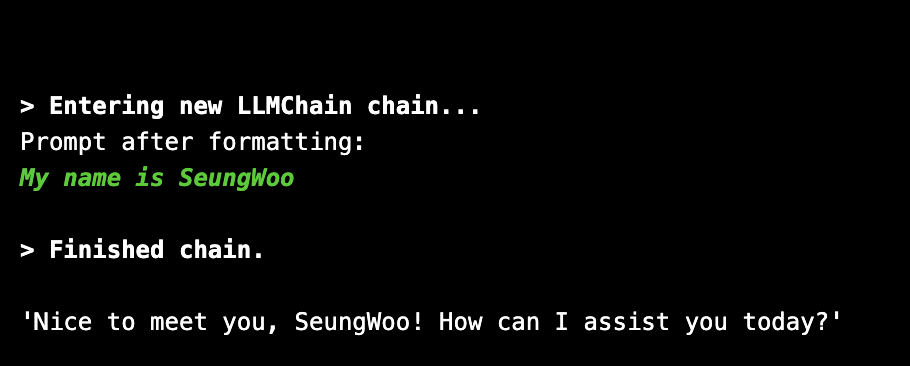
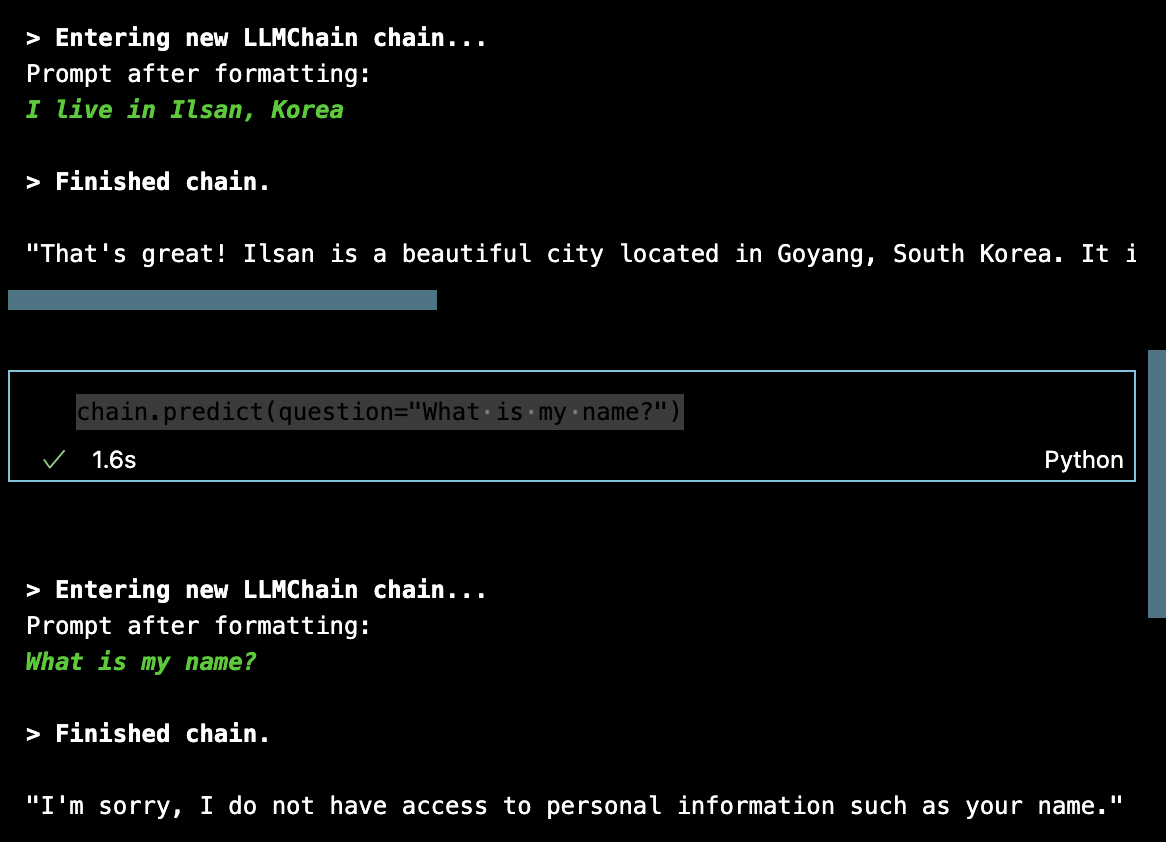
- 대화의 내역이 프롬프트에 추가되지 않았음 → 대화내역을 기억하지 못함

- 하지만 메모리를 확인해보면, 대화의 내용이 메모리에는 잘 저장되고, ConversationSummaryBufferMemory 특성상, 대화 내용을 잘 요약하고 있음
→ 그렇다면 메모리의 내용들을 프롬프트에 포함하지 않은 것임
How solve it?
- 메모리에 저장하고 있는 내용들을 LLM에게 전달해주기 위해 프롬프트에 포함시켜줘야함 (프롬프트 템플릿에 memory를 위한 공간 생성)
- memory class로 하여금 그동안의 대화기록들을 Template안에 포함시키라고 명령해줘야함
1
2
3
4
5
6
7
8
9
10
11
12
13
14
15
16
17
18
19
##2
memory=ConversationSummaryBufferMemory(
    llm=llm,
    max_token_limit=120,
    memory_key="chat_history"
)
##1
template="""
    You are a helpful AI  talking to a human.
    {chat_history}
    Human:{question}
    You:
"""
chain=LLMChain(
    llm=llm,
    memory=memory,
    prompt=PromptTemplate.from_template(template), ##1
    verbose=True,
)
- memory에게 memory_key라는 속성을 통해 대화 기록들을 chat_history라는 변수를 통해 template에 전달
- memory를 포함한 template를 LLM에게 전달
-» String Based Memory (문자열 형태로 메모리 class가 전달)
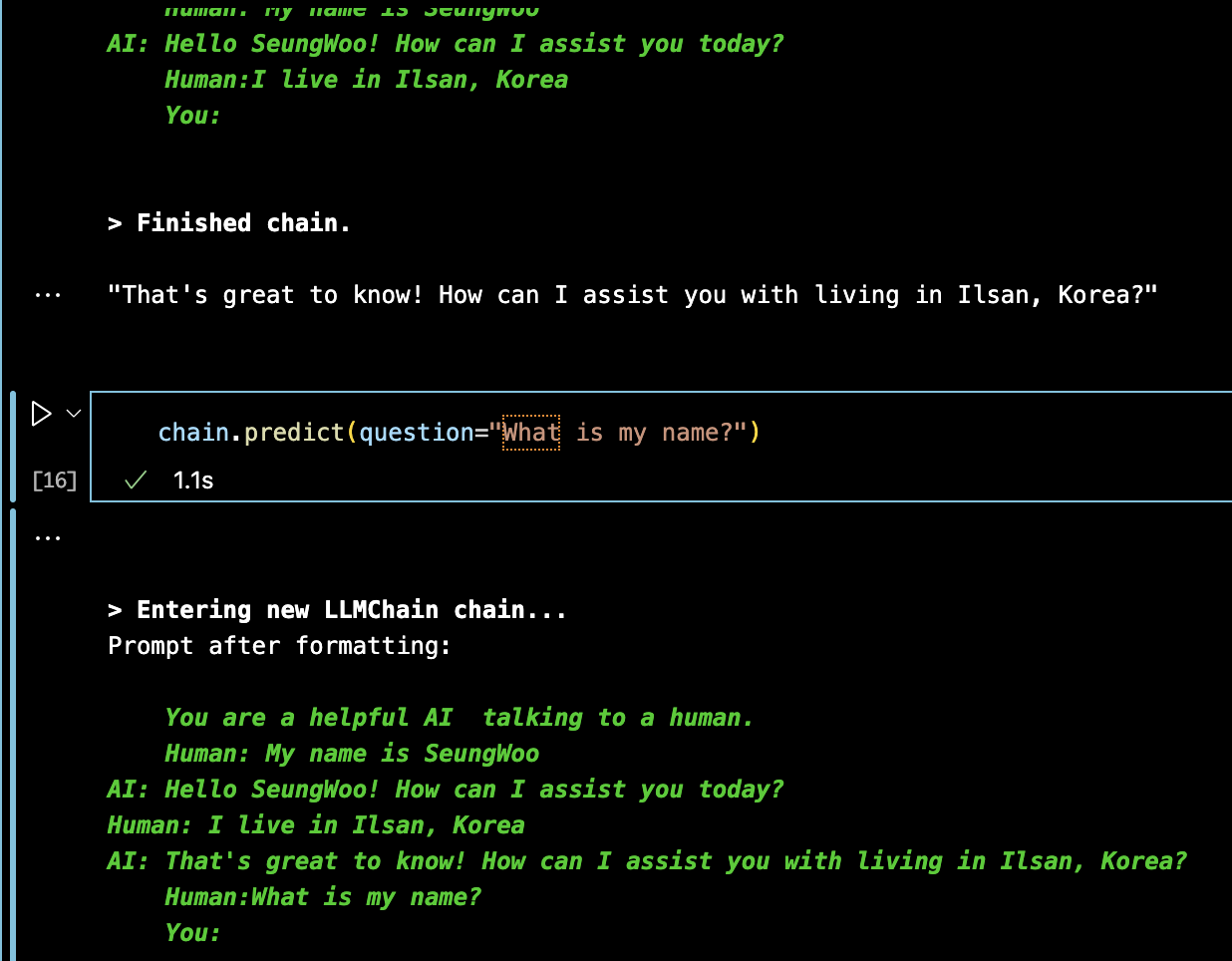
- 이렇게 chain에 메모리를 전달할 수 있다.
ChatBasedMemory
- memory class는 memory를 2가지 방식으로 출력할 수 있음
- String
- Messages
→ 아무런 설정을 하지 않으면, text(String)로 출력함
하지만, 어떻게 사용자와 AI의 대화 내용의 양을 예측할 수 있을까?
1
from langchain.prompts import MessagesPlaceholder
MessagesPlaceholder를 통해 예측하기 어려운 메세지의 양과 제한 없는 양의 메시지를 가질 수 있음
1
2
3
4
5
6
7
8
9
10
11
12
13
14
15
16
17
memory=ConversationSummaryBufferMemory(
    llm=llm,
    max_token_limit=120,
    memory_key="chat_history",
    return_messages=True,
)
template=ChatPromptTemplate.from_messages([
    ("system","You are a helpful AI talking to a human"),
    MessagesPlaceholder(variable_name="chat_history"),
    ("human","{question}"),
])
chain=LLMChain(
    llm=llm,
    memory=memory,
    prompt=promt
    verbose=True,
)
- return_messages는 memory에 저장된 대화 내용을 message형태로 변환해서 출력
- memory에 저장된 대화 내용이 어느 정도 될지? → 모르기 때문에, MessagesPlaceholder를 사용
→ return_messages를 통해 메시지 형태로 출력된 대화 내용이 MessagesPlaceholder라는 그릇에 담김
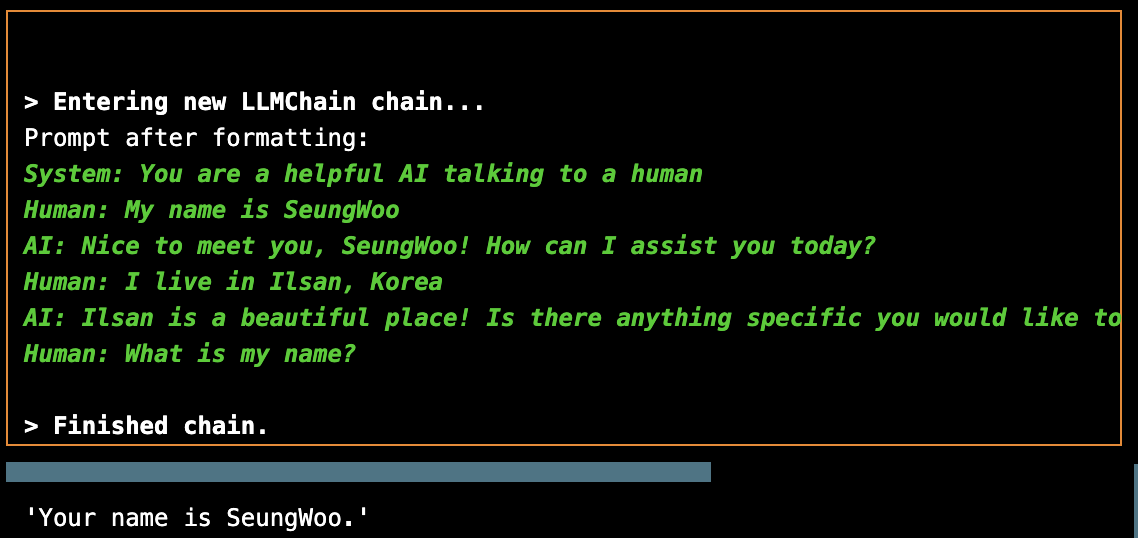
→ 이전 대화 내용을 기반으로 답변
LCEL Based Memory 권장되는 방법
- LangChain Expression Language를 사용하여 생성된 체인에 메모리를 추가하는 방식
1
2
3
4
5
6
7
8
9
10
11
12
13
14
15
16
17
18
19
llm=ChatOpenAI(temperature=0.1)

memory=ConversationSummaryBufferMemory(
    llm=llm,
    max_token_limit=120,
    memory_key="chat_history",
    return_messages=True,
)
prompt=ChatPromptTemplate.from_messages([
    ("system","You are a helpful AI talking to a human"),
    MessagesPlaceholder(variable_name="chat_history"),
    ("human","{question}"),

])
chain=prompt|llm
chain.invoke({
    "chat_history":memory.load_memory_variables({})["chat_history"],
    "question":"My name is SeungWoo"
})
LLMChain을 사용하지 않고, LCEL을 활용하려면, chain의 표현 방식 를 사용하여 chain을 .invoke()해주면 된다.
→ 하지만, chain을 생성할때마다, chat_history (memory)를 추가해줘야한다는 번거로움이 있다.
1
from langchain.schema.runnable import RunnablePassthrough
1
2
3
4
5
6
7
8
def load_memory():
    return memory.load_memory_variables({})["chat_history"]

chain=RunnablePassthrough.assign(chat_history=load_memory|prompt|llm

chain.invoke({
    "question":""
})
- LangChain은 가장 먼저 load_memory 함수를 호출
- chat_history key에 저장 (what prompt needs)
→ prompt가 format되기 전에 함수를 먼저 실행 가능
💡💡💡 chain의 모든 components는 input과 output을 가짐 💡💡💡
따라서, 위의 코드는 에러가 발생함.
1
2
3
4
5
6
7
8
9
10
11
12
13
14
15
16
17
18
19
20
21
22
23
24
25
26
27
28
from langchain.memory import ConversationSummaryBufferMemory
from langchain.chat_models import ChatOpenAI
from langchain.schema.runnable import RunnablePassthrough
from langchain.prompts import PromptTemplate,ChatPromptTemplate,MessagesPlaceholder
llm=ChatOpenAI(temperature=0.1)

memory=ConversationSummaryBufferMemory(
    llm=llm,
    max_token_limit=120,
    memory_key="chat_history",
    return_messages=True,
)
prompt=ChatPromptTemplate.from_messages([
    ("system","You are a helpful AI talking to a human"),
    MessagesPlaceholder(variable_name="chat_history"),
    ("human","{question}"),
])
def load_memory(input):
    print(input)
    return memory.load_memory_variables({})["chat_history"]
chain=RunnablePassthrough.assign(chat_history=load_memory)|prompt|llm
chain.invoke({
    "question":"My name is SeungWoo"
})

>>>
{'question': 'My name is SeungWoo'}
AIMessage(content='Nice to meet you, SeungWoo! How can I assist you today?')
- 이렇게 대답을 생성해주지만, AI의 답변을 다시 메모리에 저장해줘야함.
- invoke_chain()이라는 함수를 통해 처리
1
2
3
4
5
6
7
8
9
10
11
12
13
14
15
16
17
18
19
20
21
22
23
24
25
26
27
28
29
30
31
32
33
34
35
36
from langchain.memory import ConversationSummaryBufferMemory
from langchain.chat_models import ChatOpenAI
from langchain.schema.runnable import RunnablePassthrough
from langchain.prompts import PromptTemplate,ChatPromptTemplate,MessagesPlaceholder
llm=ChatOpenAI(temperature=0.1)

memory=ConversationSummaryBufferMemory(
    llm=llm,
    max_token_limit=120,
    return_messages=True,
)
prompt=ChatPromptTemplate.from_messages([
    ("system","You are a helpful AI talking to a human"),
    MessagesPlaceholder(variable_name="history"),
    ("human","{question}"),
])
def load_memory(input):
    print(input)
    return memory.load_memory_variables({})["history"]
chain=RunnablePassthrough.assign(history=load_memory)|prompt|llm
def invoke_chain(question):
    result=chain.invoke({
        "question":"My name is SeungWoo",
    })
    memory.save_context(
        {"input":question},
        {"output":result.content},
    )
    print(result)

invoke_chain("My name is SeungWoo")
 >>>{'question': 'My name is SeungWoo'}
content='Nice to meet you, SeungWoo! How can I assist you today?'
invoke_chain("What is my name?")
>>>{'question': 'My name is SeungWoo'}
content='Got it, SeungWoo! How can I assist you today?'
- 이렇게 LCEL을 기반으로 메모리를 Chain에 plug할 수 있다.
| result.content | 모델의 답변 중, 오직 답변만을 추출 |
|---|---|
| memory_key | 기본적으로 memory_key는 ‘history’ 라는 변수명을 사용함 (현재 코드에서는 chat_history라는 변수를 선언) |
| load_memory_variables | 메모리 로드 |
| save_context | 사람(Input)과 AI (output)을 메모리에 저장 |
| MessagesPlaceholder() | 얼마나 많은 메시지들을 전달할 것인가? (메시지 기록을 프롬프트에 전달해줄 그릇) |
| RunnablePassThrough(assign=) | Invoke (chain을 실행) 하기 전에 memory load할 수 있음 |
| invoke_chain() | 메모리를 load하고, 다시 chain의 출력을 메모리에 저장 |
| .invoke() | input ( {question} , { country} ) 등 Input을 필요로함. |
Summary
What we have to do / What is our task?
→ LLM이 가져오는 프롬프트에 대화 기록들을 넣는 것
- Off-the-shelf Chain
- LLM으로부터 자동으로 응답을 가져오고, memory를 업데이트
- 그럼에도, memory의 기록들을 프롬프트에 넣어줘야했음
- Customize Chain with LCEL
- ChatPromptTemplate, invoke_chain, ConversationSummaryBufferMemory 등 하나하나 수동으로 설정
- 프롬프트에 메모리를 추가하는 3가지 방법
- LLMChain
- Chat based Template
- Manual Memory